 |
 |
 |
|---|---|---|
| Ex 2.2: Area, Line and Point Annotations | • | Ex 2.4: Annotation Measurements |
2.3 Annotation Hierarchy
Aim:
- Create a hierarchy of annotations
Make an area annotation. Then make two more area annotations which are comletely inside of the first annotation. Select the first annotation. From the more options-button  on the annotation list, run the command
 Insert in hieararchy (  +
+  +
+  ). Check the result on the hierarchy tab.
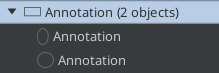
Fig. 2.3.1 – An annotation with two sub-annotations.
Note
You can use the command Resolve hierarchy ( + +  ) from the menu
 Annotations to automatically build the hierarchy of all objects in the image.